Catch downtime before
your customers do.
Uptime, SSL, and internal service monitoring. Deploy a local agent inside your private network or Kubernetes cluster — no exposed ports required.
Engineered For Absolute Certainty
Every feature is built with a single goal: making sure you are the first one to know when things go off the rails.
Multi-Channel Escalation
Configurable routing to Telegram, Slack, Teams, Email, or arbitrary Webhooks. Never miss a critical degradation event.
SSL Expiration Defense
We track certificate signatures to warn you weeks before expirations can inadvertently take down your infrastructure.
Local Monitoring Agents
Deploy a lightweight agent inside your private network to run HTTP, Ping, and Port checks without exposing internal services.
Monitor Your Private Network & Kubernetes Cluster
Deploy a lightweight agent on-premise, inside your VPC, or as a pod in your Kubernetes cluster. It checks internal APIs, databases, and services locally and uploads results — no inbound firewall ports, ever.
Unlike public-only monitors, DownWarning runs a local agent inside your infrastructure — so internal services stay internal.
Check Locally
The agent runs HTTP, Ping, and Port checks against your internal servers without exposing them.
Upload Results
Check results are sent to the DownWarning API over an encrypted connection.
View on Dashboard
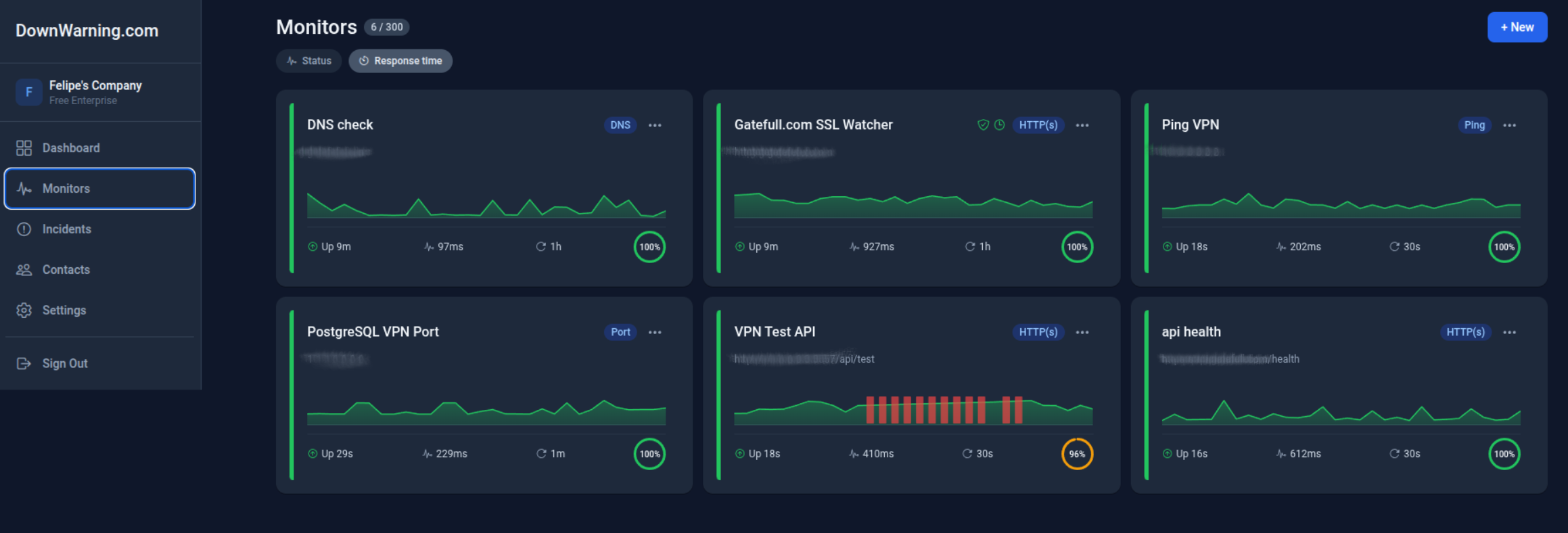
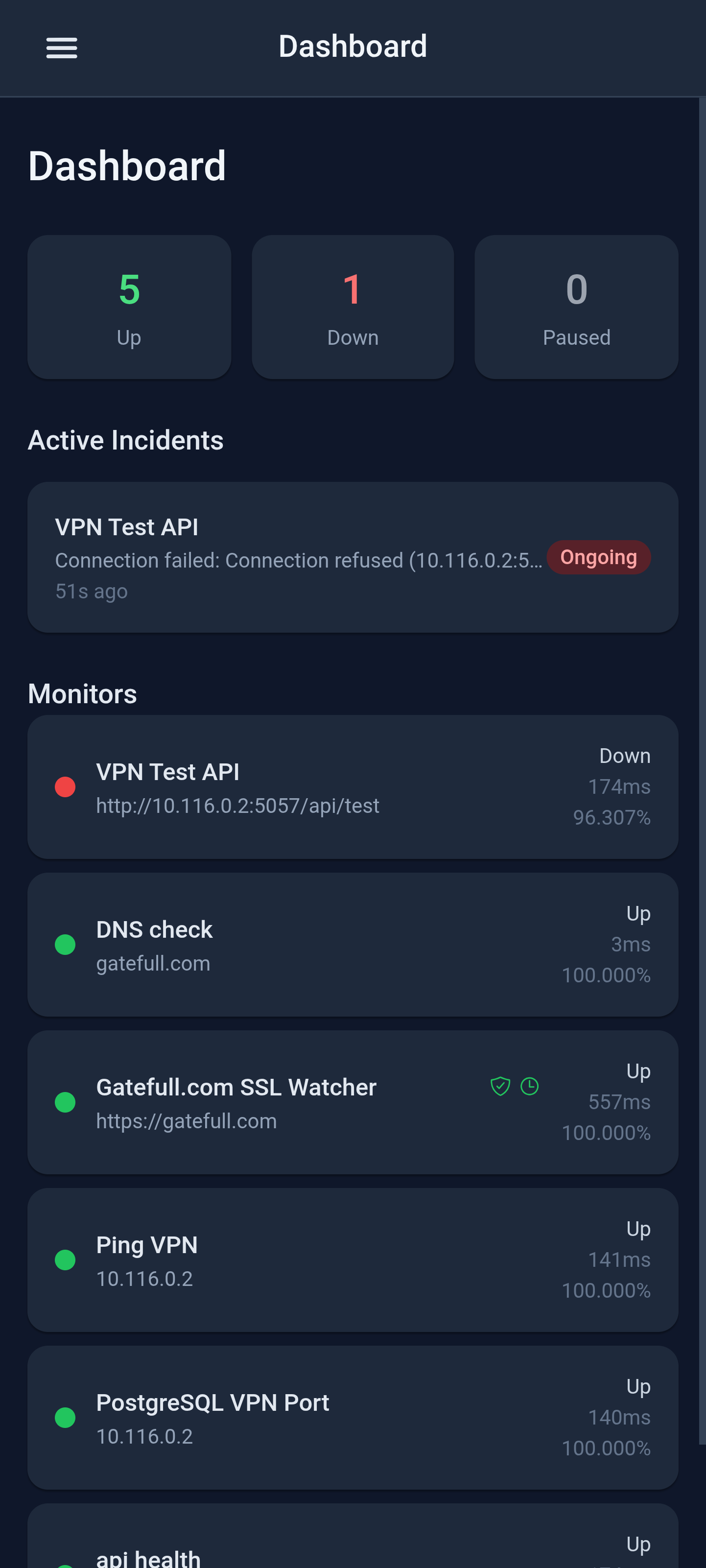
Monitor status, response times, and incidents from the DownWarning dashboard or mobile app.
Learn more: Kubernetes cluster monitoring · private network monitoring · monitor internal servers behind a firewall
Why DownWarning
An honest look at what sets DownWarning apart from generic uptime monitors.
| Feature | DownWarning | Typical alternatives |
|---|---|---|
| Local agents for private networks | ||
| Monitor Kubernetes / internal services | ||
| Works behind firewall (no open ports) | ||
| On-premise agent | ||
| Transparent BRL pricing | ||
| Native mobile app | ||
| DNS monitoring | ||
| SSL monitoring | ||
| Public status pages | Paid add-on | |
| Genuinely free plan (no card) | Limited | |
| WhatsApp & direct support |
Comparison based on publicly available information. Features may vary by plan.
Works with your stack
Get alerts where your team already works. All channels available on every plan.
Built in the open
We believe trust is earned through transparency, not marketing. Here is what we actually do.
We monitor ourselves
DownWarning runs on the same monitoring infrastructure it offers you. Our public status page shows live uptime history, incident reports, and response times — in real time.
Secure by design. Zero risk to try.
Your infrastructure data stays private. And there is genuinely no risk in trying DownWarning.
How we protect your data
- All agent-to-cloud communication is encrypted over HTTPS/TLS. Agents only make outbound connections — no inbound ports needed.
- Your internal server addresses and check results are never shared with third parties. Data is isolated per account.
- We are committed to LGPD and GDPR compliance. You can export or delete all your data at any time.
Our guarantees
Free forever
The Starter plan never expires and requires no credit card. Ever.
No credit card
Sign up with just an email. We will never ask for payment to use the free plan.
Cancel anytime
Downgrade or close your account in one click. No lock-in, no cancellation fees.
Export your data
Download your monitor config and history any time from account settings.
No risk to try. Seriously.
Security First Pricing
Choose Your Level of Certainty
Transparent pricing without surprises. Secure your infrastructure today.
Start monitoring in 30 seconds.
No credit card. No lock-in. No surprises. Just the peace of mind that comes with knowing your infrastructure is watched.
Frequently Asked Questions
Everything you need to know about DownWarning uptime monitoring.
Uptime monitoring continuously checks whether your website, API, or server is online and responding. DownWarning sends HTTP, Ping, Port, and DNS checks at configurable intervals and alerts you the moment something goes down.
Yes. Deploy our lightweight local agent inside your private network. It runs HTTP, Ping, and Port checks against your internal hosts and securely uploads the results — no need to expose anything to the internet.
DownWarning can notify you via Email, Slack, Telegram, Microsoft Teams, and arbitrary Webhooks. You can configure escalation rules so the right people are alerted at the right time.
Yes. The Starter plan is free forever — no credit card required. It includes up to 25 monitors, SSL monitoring, 7-day data retention.
DownWarning tracks your SSL certificate signatures and expiration dates. You receive alerts weeks before a certificate expires, so you can renew it before it takes down your site.
A local agent is a small, self-contained binary you run inside your network. It executes monitoring checks locally, then sends the results to the DownWarning cloud over an encrypted connection. Your internal services stay completely private.
The Starter plan supports intervals as low as 180 seconds, Pro goes down to 60 seconds, Scale goes down to 30 seconds.
Local agents communicate exclusively over HTTPS/TLS using an encrypted channel. The agent authenticates to the DownWarning API using a secret token stored locally. No inbound ports need to be opened — the agent initiates all outbound connections.
Yes. That is the whole point of local agents. The agent runs inside your network and makes outbound HTTPS calls to upload results. Your internal services never receive inbound traffic from the internet.
You can downgrade to the free Starter plan at any time — no cancellation fees. Your monitors, history, and data are preserved. If you close your account entirely, all data is permanently deleted within 30 days.
We run our own infrastructure under the same monitoring we offer you. You can see our live uptime history on our public status page. We aim for high availability and are transparent about incidents when they happen.
Yes. You can export your monitor configurations and check history from the account settings at any time. Your data is always yours.
Yes. Deploy the DownWarning local agent as a pod inside your Kubernetes cluster and it can reach internal services, pods, and ClusterIP addresses directly by hostname — no Ingress or LoadBalancer required. The agent only makes outbound HTTPS calls to report results, so nothing inside your cluster is exposed publicly.
Install the local agent on any machine behind your firewall. It runs HTTP, Ping, and Port checks against your internal servers and sends the results out over an encrypted outbound connection — you never need to open an inbound port, configure port forwarding, or set up a VPN tunnel.
Yes. The local agent runs on any on-premise Linux, macOS, or Windows machine — a physical server, VM, or container in your data center or office network — giving you the same monitoring and alerting as our public checks, entirely inside your own infrastructure.
Yes. The local agent can run HTTP checks against an internal API or Port checks against an internal database from inside your VPC or private network. Because the agent always initiates the connection outbound, your internal API and database never need a public IP address or an open port.